In the dynamic realm of UI/UX design, the tools we choose significantly influence our creative process and collaboration. Two prominent contenders in this space have been Adobe XD and Figma. As a designer who has primarily used (paper doodles) Adobe XD but recently ventured into Figma, I aim to provide an in-depth comparison from a creator’s standpoint, especially considering the evolving landscape of these tools.
Adobe XD: A retrospective
Adobe XD, introduced in 2016, quickly became a favorite among designers for its intuitive interface and seamless integration with the Adobe Creative Suite. Its features like Repeat Grid, robust prototyping capabilities, and responsive resize made it a powerful tool for designing and prototyping user interfaces. However, recent developments have cast a shadow over its future.
In June 2023, Adobe announced that XD would no longer be available for purchase as a single application but would continue to be supported for existing users and as part of the Adobe Creative Cloud All Apps subscription. This move led to speculations about the tool being in “maintenance mode,” with no further investments planned for its development.
The uncertainty surrounding Adobe XD has implications for both designers and employers. For creatives, transitioning to alternative tools may involve a learning curve and potential costs. Employers might face project delays and additional training expenses as teams adapt to new software.
Figma: The collaborative powerhouse
Figma has emerged as a formidable competitor in the design tool arena, renowned for its cloud-based platform and real-time collaboration features. Unlike Adobe XD, Figma operates entirely in the browser, eliminating the need for installations and ensuring that files are always up-to-date and accessible from anywhere.
One of Figma’s standout features is its collaborative approach. Multiple team members can work simultaneously on a design, providing real-time feedback and edits. This functionality streamlines the design process, especially for remote teams. Additionally, Figma offers robust prototyping capabilities, design libraries for consistent asset management, and a vast array of plugins to extend its functionality.
According to a 2023 survey by UX Tools, Figma was the most popular design tool, with 77% of respondents using it, while Adobe XD had a 35% usage rate. This statistic underscores Figma’s growing dominance in the design community.
Personal experience: Transitioning from Adobe XD to Figma
Having been a long-time Adobe XD user, the news and rumors swirling about its potential discontinuation hit with a mix of disappointment and inevitability. XD had been my digital sketchbook of choice for years — familiar, reliable, and deeply integrated with my design rituals. Its intuitive interface, drag-and-drop simplicity, and solid prototyping capabilities made it easy to stay in a creative flow without unnecessary distractions. So, the idea of stepping away from that comfort zone felt like giving up a trusted tool mid-project.
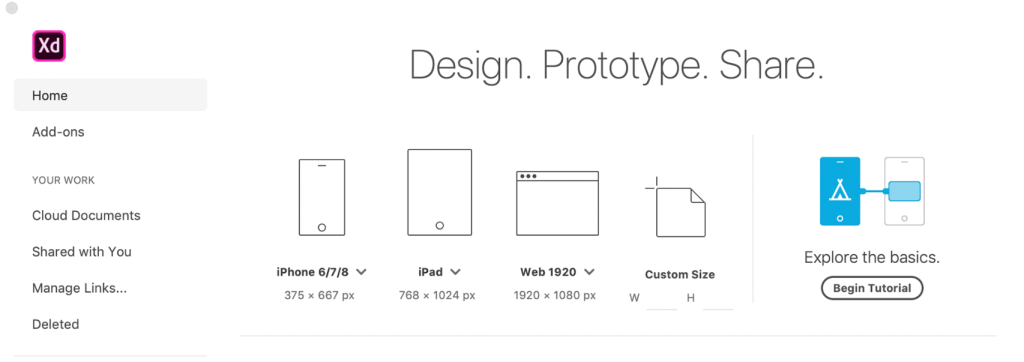
Still, change often pushes us toward growth. So I gave Figma a proper shot — cautiously at first. There was a learning curve, of course; muscle memory from XD didn’t translate perfectly, and the browser-based workspace took a bit of adjusting to. But gradually, those initial hesitations gave way to curiosity, and then to genuine appreciation.
Figma’s browser-first nature is a massive plus. No more downloading updates or syncing libraries across machines — I could pick up where I left off on any device. But what truly shifted the game for me was the real-time collaboration. Watching a colleague tweak a layout or drop comments live in the file while I was working felt less like digital design and more like a creative jam session. It removed a lot of the bottlenecks that come with back-and-forths over exported files or versioning confusion. Suddenly, designing felt more alive.
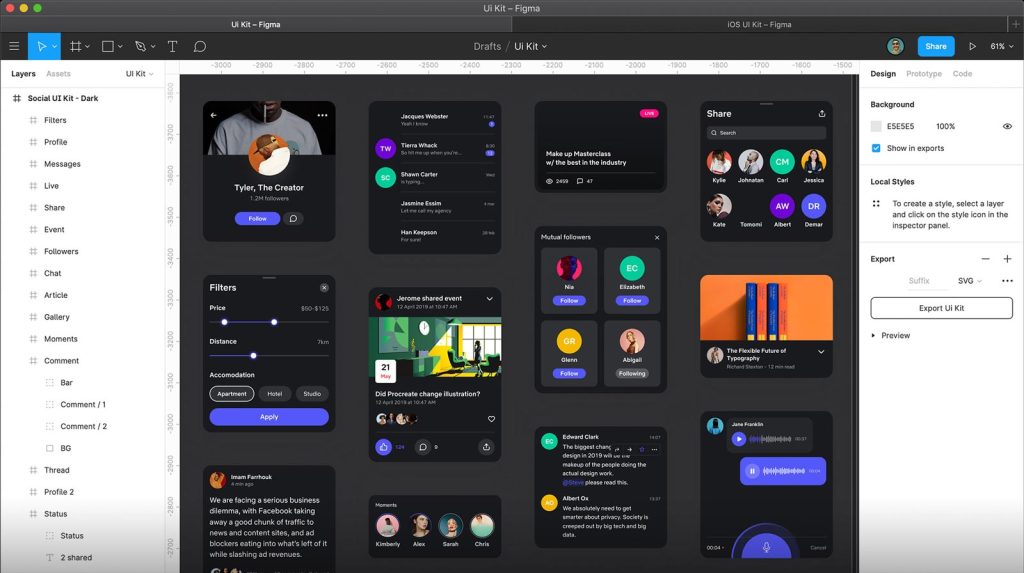
Then came auto-layout and components — features I now can’t imagine working without. Figma’s layout system forces you (in a good way) to think structurally, like a front-end developer would. It promotes scalable, responsive design thinking right from the start. It’s not just drag-and-drop; it’s about crafting systems that adapt. For product designers, especially those working in fast-paced teams or startups, that’s pure gold.
That being said, Adobe XD still holds an edge in one critical area: integration. If you’re already neck-deep in the Adobe ecosystem — bouncing between Illustrator, Photoshop, After Effects — XD remains the easiest bridge between your tools. I often found myself designing icons in Illustrator, then refining them in XD without missing a beat. Figma doesn’t quite match that level of seamlessness when it comes to heavy asset creation or intricate vector work. It’s great for interface design, but Adobe’s suite still dominates the visual asset game.
So, while I haven’t fully “abandoned” XD, I now find myself using Figma for most UI work, especially collaborative or web-heavy projects. The two tools serve different purposes in my current workflow, but the writing on the wall is hard to ignore: Figma feels like the future, and it’s designing for the now.
Key considerations for designers
When choosing between Adobe XD and Figma, several factors come into play:
- Collaboration Needs: If real-time collaboration is paramount, Figma’s cloud-based platform offers a distinct advantage.
- Integration with Other Tools: Designers relying heavily on Adobe’s suite may find XD’s integration beneficial.
- Learning Curve: Transitioning to a new tool requires time and effort. Assessing the learning curve and available resources is crucial.
- Community and Support: Figma boasts a vibrant community with extensive plugins and resources, enhancing its functionality and support.
- Future-Proofing: Given Adobe XD’s uncertain future, investing time in learning Figma might offer more long-term stability.
Conclusion
The design tool landscape is in a constant state of flux, and right now, Figma is undeniably leading the charge — not just in terms of innovation, but in how it’s redefining collaboration and accessibility in the design process. While Adobe XD has carved out a strong legacy and served the creative community admirably, its uncertain future serves as a reminder that no tool, no matter how comfortable, is immune to change.
For designers, this isn’t just a shift in software — it’s a call to stay agile. Embracing platforms like Figma isn’t simply about chasing trends; it’s about adapting our creative workflow to better align with the way modern teams build products. Its browser-based architecture, cloud-native collaboration, and increasingly powerful feature set mean that we’re not just designing — we’re co-creating, live and in sync, regardless of geography.
Exploring and mastering new tools can feel daunting, especially when you’re deep in your own routines. But in reality, it’s these moments of change that spark growth. As creators, our value isn’t tied to the tools we know, but to our willingness to evolve, experiment, and stay curious. The ability to navigate unfamiliar territory, absorb new methodologies, and still produce excellent work — that’s what keeps us relevant and resilient.
Ultimately, adaptability is more than a survival skill — it’s a creative superpower. By stepping outside our comfort zones and leaning into tools like Figma, we position ourselves not only to meet the demands of today’s digital landscape but to thrive in whatever comes next.
References
- Figma vs Sketch vs Adobe XD for web design in 2024
- Adobe Xd
- Has Adobe XD been discontinued?
- It seems Adobe’s given up on UI design (for now)
- Adobe XD Discontinued: What This Means for Creatives & Employers
- Figma vs. Adobe XD: Which Design Tool Reigns Supreme in 2024?
- Figma vs Adobe XD: Comparison Guide
- Should I learn Adobe XD as a newbie in 2024?